

Hello! I'm running into an error with Piapro Studio. I have a Miku V4X bundle that I am used to using with the Logic Pro DAW in Rosetta Mode. The computer I am using is a Mac with an Apple M5 chip and the latest versions of macOS and Logic Pro. (Normally I have to use Rosetta Mode to get Piapro Studio to work, but it works.)
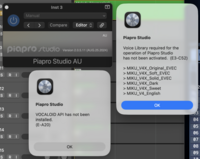
After not having used Piapro, I came back to it today out of boredom to try and play around with it. However, when I opened up the VSTi, I couldn't get the actual vocaloid editor to appear, only the gray bar that says "piapro studio version 2.0.5.11". I remembered seeing something earlier about how Rosetta Mode could stop working in future Mac updates, so I tried doing this both in Rosetta Mode and in the regular mode. However, not only did the same problem happen, but I got two new error messages.
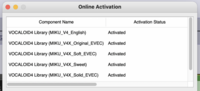
The one message said that the voice libraries (Miku V4X and Miku V4 English) had not been activated. I know that this can't be true, because I went into the Vocaloid license manager and it said that they were all activated. (The liscense manager was originally corrupted when I tried to open it, but I reinstalled the latest version from this link and it seemingly worked fine after that.) Just in case something was wrong with the voice libraries themselves, I went on sonicwire and reinstalled fresh versions of them. I still got this error. It does not make any sense.
The other message said that the Vocaloid API had not been installed. I had never seen an error message like this before, so I looked it up. It said that the Vocaloid API was normally updated during the Piapro Studio update. My version of Piapro Studio is already up to date according to sonicwire; there haven't been any updates since August 2024. Just in case, I tried reinstalling the update, and I still got the error message. I'm pretty sure there is no way to download/install/update the Vocaloid API seperately.
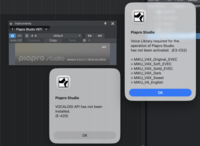
I thought maybe the problem might be related to the DAW itself. Then I remembered that my Miku V4X bundle came with a copy of Studio One Pro 4. I reinstalled that, and tried opening up the VSTi there. I got the same exact set of errors. So I'm pretty sure that this problem isn't related to the DAW. Maybe something is wrong with the piapro files themselves, but I reinstalled them and still got the error. I don't think the problem is related to my hardware, because I sucessfully used Piapro on this computer about a month or two ago when I first got the computer.
Either the liscense manager is lying to me, both of my DAWs are lying to me, the operating system is lying to me, or sonicwire is lying to me.
Please help me figure out what's causing this problem, and if it's even possible to fix.
After not having used Piapro, I came back to it today out of boredom to try and play around with it. However, when I opened up the VSTi, I couldn't get the actual vocaloid editor to appear, only the gray bar that says "piapro studio version 2.0.5.11". I remembered seeing something earlier about how Rosetta Mode could stop working in future Mac updates, so I tried doing this both in Rosetta Mode and in the regular mode. However, not only did the same problem happen, but I got two new error messages.
The one message said that the voice libraries (Miku V4X and Miku V4 English) had not been activated. I know that this can't be true, because I went into the Vocaloid license manager and it said that they were all activated. (The liscense manager was originally corrupted when I tried to open it, but I reinstalled the latest version from this link and it seemingly worked fine after that.) Just in case something was wrong with the voice libraries themselves, I went on sonicwire and reinstalled fresh versions of them. I still got this error. It does not make any sense.
The other message said that the Vocaloid API had not been installed. I had never seen an error message like this before, so I looked it up. It said that the Vocaloid API was normally updated during the Piapro Studio update. My version of Piapro Studio is already up to date according to sonicwire; there haven't been any updates since August 2024. Just in case, I tried reinstalling the update, and I still got the error message. I'm pretty sure there is no way to download/install/update the Vocaloid API seperately.
I thought maybe the problem might be related to the DAW itself. Then I remembered that my Miku V4X bundle came with a copy of Studio One Pro 4. I reinstalled that, and tried opening up the VSTi there. I got the same exact set of errors. So I'm pretty sure that this problem isn't related to the DAW. Maybe something is wrong with the piapro files themselves, but I reinstalled them and still got the error. I don't think the problem is related to my hardware, because I sucessfully used Piapro on this computer about a month or two ago when I first got the computer.
Either the liscense manager is lying to me, both of my DAWs are lying to me, the operating system is lying to me, or sonicwire is lying to me.
Please help me figure out what's causing this problem, and if it's even possible to fix.

