

For this tutorial you will need:
1. Take your audio file, and separate the the vocals from the instrumental using a stem separator tool, such as this one. Make sure any websites you download files from are safe to use. Use the tool a second time to remove the backing vocals as well.
2. Find the BPM of your song, song BPMs can normally be found from an online search. "BPM" means "beats per minute" and refers roughly to the speed of the music. Setting the correct BPM will help your notes line up with the gridlines on Synthesizer V's user interface, which will make it easier for you to arrange them correctly.
3. Open Synthesizer V and set the BPM:
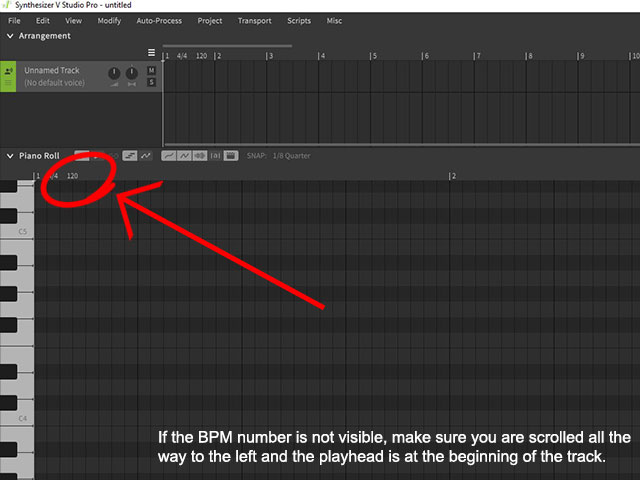
Synthesizer V Studio 1: Double click the small number '120' at the start of your track, located just above the piano, below the selection options.
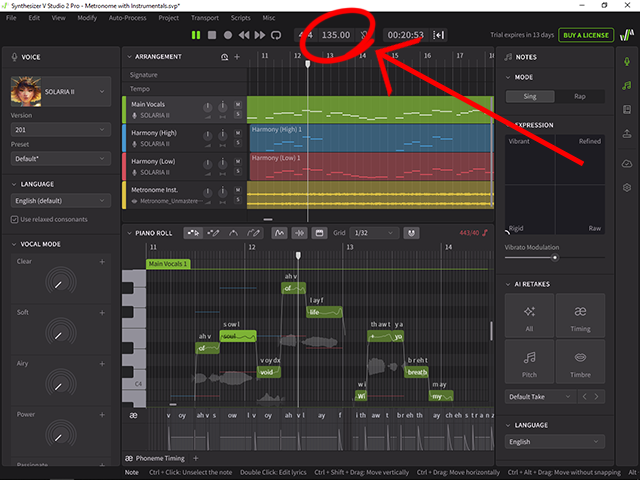
Synthesizer V Studio 2: Click the 3-digit number to the right of the play/pause buttons at the top of your screen.
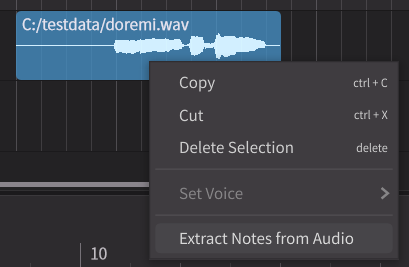
4. Import the vocals-only audio file of your song into Synthesizer V as an instrumental track. Right click the track and choose 'Extract Notes from Audio'. This option is not available in Synthesizer V 1 Studio Basic. If you are using SV1 Basic, use an alternative audio to midi converter available online, then import that midi into Synthesizer V.
5. This will give you the rough melody and timing for your song. Some notes will be in the wrong place and require cleanup, and the lyrics will be gibberish. Remove any overlapping notes and enter the correct lyrics.
6. Edit the singing to your liking using Synthesizer V's parameters and pitch drawing tools. Vocal synth users commonly call this step "tuning". To learn about these parameters and how to use them, use Synthesizer V's manual (SV1, SV2), and official tutorial series.
7. Listen closely to the song you want to cover: you are likely to notice times when there is more than one voice singing. These background vocal layers are called vocal stacks or vocal harmonies. Vocal stacks are when the same song is sung multiple times, then layered to make the lead vocal sound fuller. Harmonies are when multiple voices sing different melodies at the same time.
The same vocal layering principles for real singers also apply to Synthesiser V.
Creating vocal stacks does not require any music theory knowledge; simply duplicate your vocal lead and alter it to produce a slightly different performance. Generating new takes, or using SV2's "Unison" function can speed up this process.
Vocal stacks introductory tutorial
To create harmonies, it's beneficial to learn a few concepts from music theory. You will need to know the basics of scales and intervals, which can be learnt in a day.
To write harmonies, you need to know the scale and key used by the song you're covering, for example "C Major". Like BPMs, you can find this information for most popular songs with a quick browser search for [song name]+"key".
Next, take a little time to learn the music theory behind what makes two notes sound pleasing or dissonant to the ear when played together. This will allow you to write a melody for your harmonies in the correct key, with notes that won't clash with your lead vocal.
Basic music theory introduction
Musical scales tutorial
Musical intervals tutorial
Vocal harmonies introduction
8. Export all your new singing tracks as audio files and bring them into your DAW. Set the vocal stacks and harmonies to be quieter than your lead vocal. Also import the song's instrumental (AKA "off-vocal") as another track.
9. The next step is mixing. Mixing is the process of applying effects to the vocal tracks so they sound polished and 'mix' well with the instrumental. There are innumerable tutorials online explaining how to mix vocals, so choose a teacher and style that you find easy to understand. Synthesizer V vocals are mixed with the same techniques as real singers.
Make sure you learn about compression, EQ, reverb, and delay, then apply each to your vocals. There is no one-size-fits-all for mixing: the settings you use will depend on the genre of your song and your personal taste.
10. The final stage is mastering. Mastering is, in essence, another layer of mixing. Like mixing, many tutorials are available for beginners and specific DAWs. Your instrumental is already mastered unless labelled otherwise, so only master the vocals.
Make sure the final result isn't clipping: clipping is when your audio is too loud, which normally causes a red warning to appear near your DAW's volume bar. When your audio is clipping, it will distort.
I made a post going into detail about both mixing and mastering here.
11. Ask someone to listen to your cover and tell you if the vocals sound too loud or too quiet. When you listen to the same piece of audio for a long time, you begin to hear it differently, so it's important to get feedback from a new listener. In many cases, you will be unable to hear volume problems on your own.
12. Render (export) your cover from your DAW as a WAV file. WAV is a file format for high quality audio, and can be used in video editing software or uploaded to websites.
You did it!
Copyright disclaimer: Covers cannot be monetised without the original artist's permission, which includes uploading to streaming websites. Be respectful of artists' wishes when covering songs.
- A high quality audio file of the song you want to cover.
- A DAW: A DAW is a program for editing and creating music. Examples: Ableton, Reaper, FL Studio, Bitwig*
- Synthesizer V Studio 1 or 2
1. Take your audio file, and separate the the vocals from the instrumental using a stem separator tool, such as this one. Make sure any websites you download files from are safe to use. Use the tool a second time to remove the backing vocals as well.
2. Find the BPM of your song, song BPMs can normally be found from an online search. "BPM" means "beats per minute" and refers roughly to the speed of the music. Setting the correct BPM will help your notes line up with the gridlines on Synthesizer V's user interface, which will make it easier for you to arrange them correctly.
3. Open Synthesizer V and set the BPM:
Synthesizer V Studio 1: Double click the small number '120' at the start of your track, located just above the piano, below the selection options.
Synthesizer V Studio 2: Click the 3-digit number to the right of the play/pause buttons at the top of your screen.
4. Import the vocals-only audio file of your song into Synthesizer V as an instrumental track. Right click the track and choose 'Extract Notes from Audio'. This option is not available in Synthesizer V 1 Studio Basic. If you are using SV1 Basic, use an alternative audio to midi converter available online, then import that midi into Synthesizer V.
5. This will give you the rough melody and timing for your song. Some notes will be in the wrong place and require cleanup, and the lyrics will be gibberish. Remove any overlapping notes and enter the correct lyrics.
6. Edit the singing to your liking using Synthesizer V's parameters and pitch drawing tools. Vocal synth users commonly call this step "tuning". To learn about these parameters and how to use them, use Synthesizer V's manual (SV1, SV2), and official tutorial series.
7. Listen closely to the song you want to cover: you are likely to notice times when there is more than one voice singing. These background vocal layers are called vocal stacks or vocal harmonies. Vocal stacks are when the same song is sung multiple times, then layered to make the lead vocal sound fuller. Harmonies are when multiple voices sing different melodies at the same time.
The same vocal layering principles for real singers also apply to Synthesiser V.
Creating vocal stacks does not require any music theory knowledge; simply duplicate your vocal lead and alter it to produce a slightly different performance. Generating new takes, or using SV2's "Unison" function can speed up this process.
Vocal stacks introductory tutorial
To create harmonies, it's beneficial to learn a few concepts from music theory. You will need to know the basics of scales and intervals, which can be learnt in a day.
To write harmonies, you need to know the scale and key used by the song you're covering, for example "C Major". Like BPMs, you can find this information for most popular songs with a quick browser search for [song name]+"key".
Next, take a little time to learn the music theory behind what makes two notes sound pleasing or dissonant to the ear when played together. This will allow you to write a melody for your harmonies in the correct key, with notes that won't clash with your lead vocal.
Basic music theory introduction
Musical scales tutorial
Musical intervals tutorial
Vocal harmonies introduction
8. Export all your new singing tracks as audio files and bring them into your DAW. Set the vocal stacks and harmonies to be quieter than your lead vocal. Also import the song's instrumental (AKA "off-vocal") as another track.
9. The next step is mixing. Mixing is the process of applying effects to the vocal tracks so they sound polished and 'mix' well with the instrumental. There are innumerable tutorials online explaining how to mix vocals, so choose a teacher and style that you find easy to understand. Synthesizer V vocals are mixed with the same techniques as real singers.
Make sure you learn about compression, EQ, reverb, and delay, then apply each to your vocals. There is no one-size-fits-all for mixing: the settings you use will depend on the genre of your song and your personal taste.
10. The final stage is mastering. Mastering is, in essence, another layer of mixing. Like mixing, many tutorials are available for beginners and specific DAWs. Your instrumental is already mastered unless labelled otherwise, so only master the vocals.
Make sure the final result isn't clipping: clipping is when your audio is too loud, which normally causes a red warning to appear near your DAW's volume bar. When your audio is clipping, it will distort.
I made a post going into detail about both mixing and mastering here.
11. Ask someone to listen to your cover and tell you if the vocals sound too loud or too quiet. When you listen to the same piece of audio for a long time, you begin to hear it differently, so it's important to get feedback from a new listener. In many cases, you will be unable to hear volume problems on your own.
12. Render (export) your cover from your DAW as a WAV file. WAV is a file format for high quality audio, and can be used in video editing software or uploaded to websites.
You did it!
Copyright disclaimer: Covers cannot be monetised without the original artist's permission, which includes uploading to streaming websites. Be respectful of artists' wishes when covering songs.