
SynthV Synthesizer V Studio 2
- Thread starter lIlI
- Start date

D
Deleted member 1036
Guest
Exploration time...
The Synthesizer V manual isn’t exactly exceptional, and it often leaves me wondering how one might use certain parameters in a practical setting. For example, why would I use “Tone Shift”?
Some time ago I learned that vowel sounds change as we lower or raise our voice. That is to say, vowels sound one way when we whisper, and another when we shout. This phenomenon is caused by a shift in emphasis of the harmonic frequencies of any given vowel.
For most pitched musical instruments, the fundamental frequency is the loudest partial, while the upper harmonics become progressively quieter. There are some exceptions, such as the oboe where the fifth harmonic (third overtone as oboes produce only odd harmonics) is the loudest. But the human vowel sounds are not so rigid.
“Don’t speak to me in that tone of voice!”
When you shout, the upper harmonics become emphasized. Whispering does the opposite.
In terms of singing, loud operatic singing emphasizes the upper harmonics, allowing the vocalist to be heard above an orchestra. (Remember, orchestral instruments become quieter in the upper harmonics, the opposite of a loud human voice.) Crooners, on the other hand, have stronger lower harmonics that sound like they are singing quietly into your ear. Or at least quietly into the microphone. (Note that microphone technology is crucial to the existence of crooning.)
Is this what the “Tone Shift” thing in SynthV is doing? Changing between an “outdoor” voice and an “indoor” voice? It kinda sounds like it, but I wanted to put my hypothesis to the test.
And here’s the result using the [a] vowel:
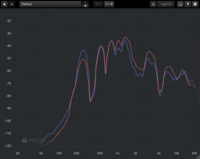
The red line represents a higher (not highest) “Tone Shift” setting, and the blue line represents a lower (not lowest) setting. Notice how the red fundamental is much quieter than the blue fundamental. Also note how the red upper harmonics are louder than the blue harmonics (except near the very top, which is getting to the limit of my hearing range.)
In practical terms, one could equate a higher “Tone Shift” setting to a louder voice, and/or one further from the microphone; and a lower setting to a quieter voice, and/or one closer to the microphone. Operatic versus crooning!
To be fair, however, the change is not super dramatic, but it’s enough to make a meaningful difference in the correct musical context.
Have fun!
The Synthesizer V manual isn’t exactly exceptional, and it often leaves me wondering how one might use certain parameters in a practical setting. For example, why would I use “Tone Shift”?
Some time ago I learned that vowel sounds change as we lower or raise our voice. That is to say, vowels sound one way when we whisper, and another when we shout. This phenomenon is caused by a shift in emphasis of the harmonic frequencies of any given vowel.
For most pitched musical instruments, the fundamental frequency is the loudest partial, while the upper harmonics become progressively quieter. There are some exceptions, such as the oboe where the fifth harmonic (third overtone as oboes produce only odd harmonics) is the loudest. But the human vowel sounds are not so rigid.
“Don’t speak to me in that tone of voice!”
When you shout, the upper harmonics become emphasized. Whispering does the opposite.
In terms of singing, loud operatic singing emphasizes the upper harmonics, allowing the vocalist to be heard above an orchestra. (Remember, orchestral instruments become quieter in the upper harmonics, the opposite of a loud human voice.) Crooners, on the other hand, have stronger lower harmonics that sound like they are singing quietly into your ear. Or at least quietly into the microphone. (Note that microphone technology is crucial to the existence of crooning.)
Is this what the “Tone Shift” thing in SynthV is doing? Changing between an “outdoor” voice and an “indoor” voice? It kinda sounds like it, but I wanted to put my hypothesis to the test.
And here’s the result using the [a] vowel:
The red line represents a higher (not highest) “Tone Shift” setting, and the blue line represents a lower (not lowest) setting. Notice how the red fundamental is much quieter than the blue fundamental. Also note how the red upper harmonics are louder than the blue harmonics (except near the very top, which is getting to the limit of my hearing range.)
In practical terms, one could equate a higher “Tone Shift” setting to a louder voice, and/or one further from the microphone; and a lower setting to a quieter voice, and/or one closer to the microphone. Operatic versus crooning!
To be fair, however, the change is not super dramatic, but it’s enough to make a meaningful difference in the correct musical context.
Have fun!


That's not quite it. Did you check the fan made manual too?
Tone Shift - Synthesizer V Studio Unofficial User Manual
It explains it pretty clearly. And if I remember correctly, the official video tutorial also explains this. But to reiterate, it can force the timbre and pronunciation of the voice to sound as it would if it were 4 semitones down, for example, or 4 semitones up. That's why it's in cents. So basically, if you have a voicebank that goes into falsetto at C5, and you don't want that for your song, you can use tone shift to take the tone from four semitones below that and use that at C5. So the most common usage is to change the register the voice is using.
The official video tutorial talks about tone shift at 1:49.
Tone Shift - Synthesizer V Studio Unofficial User Manual
It explains it pretty clearly. And if I remember correctly, the official video tutorial also explains this. But to reiterate, it can force the timbre and pronunciation of the voice to sound as it would if it were 4 semitones down, for example, or 4 semitones up. That's why it's in cents. So basically, if you have a voicebank that goes into falsetto at C5, and you don't want that for your song, you can use tone shift to take the tone from four semitones below that and use that at C5. So the most common usage is to change the register the voice is using.
The official video tutorial talks about tone shift at 1:49.
D
Deleted member 1036
Guest
I wouldn't call that a clear explanation. It reads like someone trying to explain it to themselves while in the process of writing.That's not quite it. Did you check the fan made manual too?
Tone Shift - Synthesizer V Studio Unofficial User Manual
It explains it pretty clearly. And if I remember correctly, the official video tutorial also explains this. But to reiterate, it can force the timbre and pronunciation of the voice to sound as it would if it were 4 semitones down, for example, or 4 semitones up. That's why it's in cents.
In my opinion, a good explanation would start with practical use scenarios for those that want to get up and go. That would then be followed by a detailed technical explanation for people (like me) who want further information.
Nevertheless, cents are just another way of measuring frequency, but in relation to note pitch rather than absolute frequency. When shouting or whispering, the frequency shift of emphasized harmonics can be measured in cents if one wishes.
The video says "kinda like moving between head voice and chest voice." I will concede that this is a good description. Head vs chest changes the timbre in a manner similar to loud vs quiet, and that's not a coincidence. Shouting increases airflow, which puts more pressure on the vocal folds, thereby changing how they vibrate. Head voice involves stretching the vocal folds, which puts more tension on the folds, also changing how they vibrate. In both cases, the resonant frequencies are altered in a similar manner.The official video tutorial talks about tone shift at 1:49.
It's important to remember that "head voice" does not mean singing with the head, and "chest voice" does not mean singing with the chest. These designations refer to human perception of frequency, which is influenced by our physiology. (As that weird-but-awesome mixing video mentions, the skull is a resonator.) So a voice with higher resonant frequencies is a "head voice," and one with lower resonant frequencies is a "chest voice." The same could be set for quiet vs loud voices. (e.g. Shouting your head off.)
Of course, the "Tone Shift" parameter is in reality neither head vs voice or loud vs quiet, as it is more of an artificial approximation.
(Finally, I'm not filled with confidence by any tutorial that uses "kinda" to describe functions.)


Is there a parameter that is similar to the Vocaloid parameter Portamento? I haven't been able to find one, and for now I'm just manually adding it, but that gets tedious after a bit.
No, you used to be able to adjust portamento on a note by note basis though, and select multiple notes as well.Is there a parameter that is similar to the Vocaloid parameter Portamento? I haven't been able to find one, and for now I'm just manually adding it, but that gets tedious after a bit.
D
Deleted member 1036
Guest
The new version has a "Bypass gain and panning" option in the render dialogue. Nice.
Unfortunately, it still does not bypass solo or mute toggles. I know this because just now I once again fell victim to the "you used solo button—it's not very effective at rendering all tracks" trap.
Unfortunately, it still does not bypass solo or mute toggles. I know this because just now I once again fell victim to the "you used solo button—it's not very effective at rendering all tracks" trap.


D
Deleted member 1036
Guest
The new version must have some sort of on-disk buffer for rendered tracks. I just loaded up an in-progress project and it could play right away without having to re-rendering everything. Nice.


A new Dreamtonics letter voice, Takumi, has been announced!
From the video description:
From the video description:
On a bittersweet note, Takumi Ishida was inspired to create a SynthV to preserve his voice after contracting cancer. [DTMStation Interview]Synthesizer V voice Takumi (native language: Japanese) is a male tenor voice with a lyrical, classical influence. His tone blends the character of musical theatre with elements of light operatic (operetta) technique.
Based on the singing voice of singer-songwriter Takumi Ishida, his voice features a smooth, slightly husky vocal quality with a clear, rounded tone, strong vibrato, plus classically supported breath control. His voice also carries a warm, textured character that resonates primarily in the mid-to-low frequency range.
Allowing for expressive performances across a wide range of musical styles, Takumi also includes a versatile selection of timbres and vocal modes - Nasal, Soft, Whispery and Powerful - fluently supporting Japanese, English, Mandarin Chinese, Cantonese Chinese, Spanish and Korean languages.


I always love seeing vocals made to preserve and/or be in memory of someone's voice, whether it be for a negative note or for simply transitioning. I don't normally like masculine vocals, but this one really stands out to me for some reason. I might get him!
I've been having a strange issue with Yamine Renri Plus. I was testing her on the SVP for weathergirl, and it almost seemed like she hit a range limit. It was at about A5-ish iirc, but past that her volume, which was already pretty soft, just decreased to nothing at all. By the final chorus, she was just really quiet, not at all like most other vocal synths who just become more robotic the higher they're forced to sing. At first I though the cause might be the fact that she's based on concat recordings, but I'm not sure now. Does anyone else who has Renri Plus have this problem?

Dreamtonics announced two new English voicebanks, Aurielle and Sylva.
Aurielle (native language: English) is a female voice with a warm, intimate tone & expressive mezzo-soprano range. She moves from soft, confessional verses to dramatic, emotionally charged climaxes, blending breathy vulnerability with rich resonance.
Sylva (native language: English) is a Latin-derived name meaning “forest” or “woods,” related to Sylvia. It evokes nature and carries a soft, organic feel. Her voice combines a smooth, mellow tone with both light and powerful resonance, shifting from delicate, intimate moments to strong, emotional peaks with expressive, chant-like phrasing.
Dreamtonics, after all these years, still feels like they're a bit oblivious to the gaps in their lineup - these two are both very pretty, but I already have pretty. I've had pretty since Qing Su.  There are so many unique voice types they could be exploring, as opposed to retreading variations on familiar styles.
On the plus side, their names read more like proper artist stage names, so producers aren't forced into putting goofy titles that read like 'feat. Jim', haha.
There are so many unique voice types they could be exploring, as opposed to retreading variations on familiar styles.On the plus side, their names read more like proper artist stage names, so producers aren't forced into putting goofy titles that read like 'feat. Jim', haha.


When we saw Aurielle teased earlier this month, I had hoped it was a native Spanish voice. I agree, these voices are nice, but they're not groundbreaking or anything we haven't had before. Aurielle especially, despite being listed as pop, isn't really the "pop singer" you'd hear on the radio with the likes of Sabrina Carpenter, Tate Mcrae, etc.Dreamtonics, after all these years, still feels like they're a bit oblivious to the gaps in their lineup - these two are both very pretty, but I already have pretty. I've had pretty since Qing Su.
On the plus side, their names read more like proper artist stage names, so producers aren't forced into putting goofy titles that read like 'feat. Jim', haha.
If they weren't English native, then I'd be more understanding, but it just feels like treading on the same ground over and over at this point...


oh... it's more of what we already have...
when i saw the name sylva, i'd hoped for a sec she would be an avanna-like voice... seems my hopes were dashed
when i saw the name sylva, i'd hoped for a sec she would be an avanna-like voice... seems my hopes were dashed


i will give them this: i like these new demo videos they are doing where there is a little bit of a song, and then an explanation of the voice and features in the engine. its like a condensed version of what ES has been doing. thats nice.
it is a shame though, because DT does produce some good quality stuff. i would love to see them utilize this quality in more varied voice types so i had more reason to own them.
it is a shame though, because DT does produce some good quality stuff. i would love to see them utilize this quality in more varied voice types so i had more reason to own them.
I'd prefer to have a song demo too...i will give them this: i like these new demo videos they are doing where there is a little bit of a song, and then an explanation of the voice and features in the engine. its like a condensed version of what ES has been doing. thats nice.
another vocal drop with no warning lol
definitely an interesting sound here. after the last two native english voices we just got... it does feel like their english voices have lacked a lot. i feel their chinese ones have a couple of times tackled specific genres or singing styles a lot better.
definitely an interesting sound here. after the last two native english voices we just got... it does feel like their english voices have lacked a lot. i feel their chinese ones have a couple of times tackled specific genres or singing styles a lot better.
Synthesizer V voice Chen Li (native language: Chinese) is a male voice with a rough, gravelly timbre and unconventional phrasing, delivering a deeply characterful and expressive performance, blending raw texture with nuanced control. Its weathered tone carries a sense of grit and authenticity, while remaining capable of subtle dynamic shifts, from intimate, breathy passages to more forceful, impassioned delivery.
Chen Li, a name meaning “strength,” “beauty,” or “standing firm”, excels in genres that embrace imperfection and individuality, offering a distinctive palette of tonal colours, flexible phrasing, and a strong sense of personality suited to all kinds of rock, metal, blues, jazz, theatrical, and alternative styles.
Chen Li also includes a versatile selection of timbres and vocal modes - Airy, Chest, Emotional, Gentle and Powerful - fluently supporting Mandarin Chinese, Cantonese Chinese, English, Japanese, Spanish and Korean languages.
I'm glad they swiftly released a unique voice haha, but that does make the homogeneity of their feminine English voices all the more strange.